 HouseChores
A walkthrough
The wall tablet
An old tablet on the kitchen wall. One screen the whole house reads without asking anyone.
Five minutes to set up. Nothing to install.
07:12
Nobody has to ask
Every house runs on one question: what’s mine today? Usually one person answers it, out loud, on repeat.
On the wall, it answers itself.
Readable from across the kitchen.
Setting it up
Add ?kiosk to the address
housechores.app/?kioskThat is the whole switch.
?kiosk=0 turns it off again.
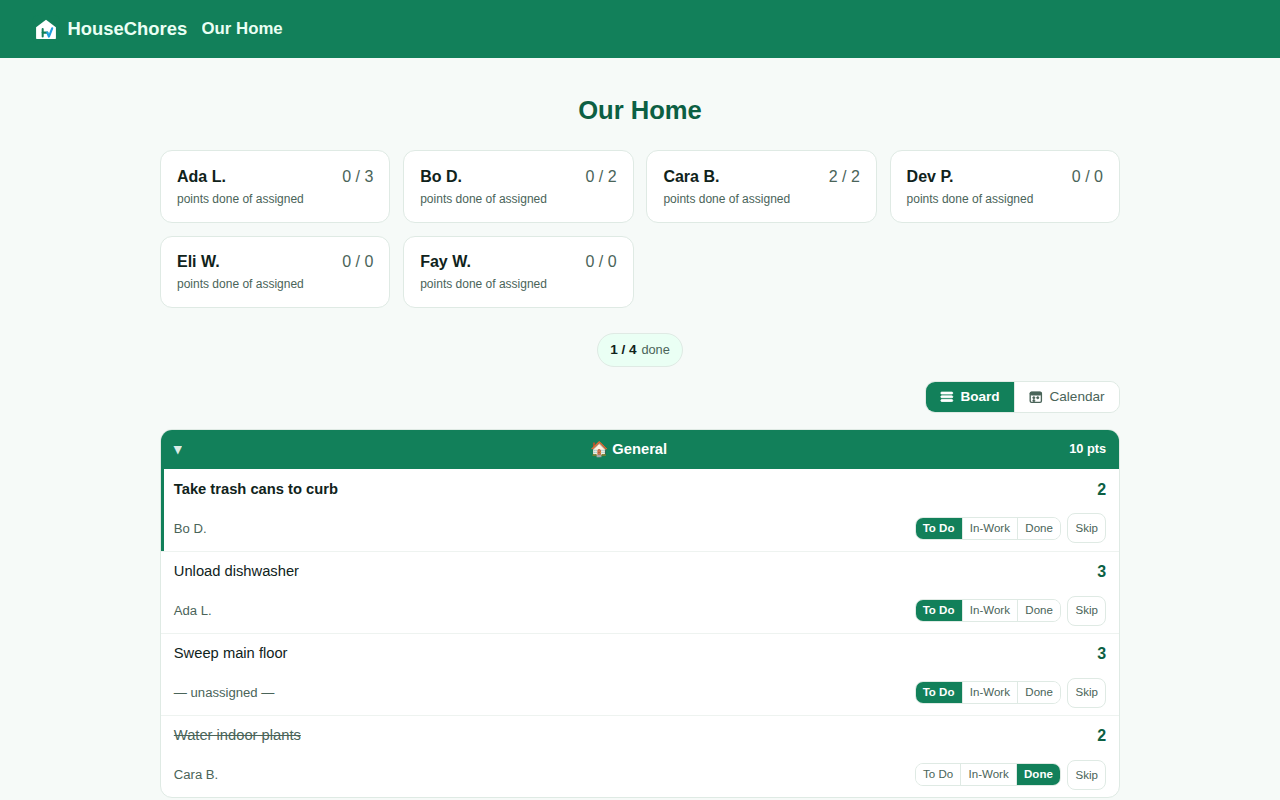
A real screen, not a drawing. The menu, sign-out and settings are gone — a wall-height tap can’t wander into them — but the status buttons stay, so the wall can still be worked from.
What changes
Three things, all about being a wall
22:04
At ten, it sleeps
A bright panel in a dark kitchen is a nuisance. From 22:00 to 06:00 the board goes near-black.
Brightened here so you can read it. On the wall it’s barely a glow — and it runs on your household’s clock, not the tablet’s.
Getting out
Hold the logo
Kiosk browsers often hide the address bar, so the way out lives on the screen.
Press and hold for two and a half seconds — long enough that a passing hand won’t trigger it.
Leave kiosk view on this device?
LeaveStayThis device only. Nobody else’s screen changes.
What you need
Probably a drawer
?kiosk and hang it up.